
Support that comes to the building
Most IT support for a small Orlando business is remote: a session on the affected machine, a change on the firewall, a mailbox fixed from the admin console. The rest cannot be done from a desk somewhere else. A server that will not boot, a switch that has died in a hot closet, a new suite to fit out, a network that slows every afternoon for a reason nobody can find from the outside: all of those need someone in the room. SPCom Solutions does both, and this page is about the second kind. The ongoing arrangement, where we are responsible for the computers and the network between visits, is described on our managed IT services page.
Where the work happens matters more in Orlando than in a smaller town, because the metro is spread out and because so many businesses sit in buildings they do not control. The sections below cover the situations that come up most and what each one needs.
Downtown and the I-4 corridor: offices in buildings you do not control
In a multi-tenant building the internet service arrives in a telecom room the landlord controls, the carrier hands off there, and the tenant’s network begins wherever the building’s riser cabling lands in the suite. When the office goes offline, the first question is which side of that line the fault is on, and the answer decides whether the call goes to the carrier, the property manager or us. Access to the telecom room is on the building’s terms, often during business hours and with notice, which has to be planned for rather than discovered at nine on a Monday.
Good support in that setting is mostly documentation: where the suite’s uplink lands, which patch panel ports feed which desks, an exported copy of the firewall configuration, the carrier’s circuit ID and the property manager’s contact. We pull and label the cabling in these buildings as well, so the suite’s wiring is written down from the day it goes in; the cabling side of the same room is on our Orlando structured cabling page.
Medical practices, hospitality and professional firms
A clinic or dental practice near one of Orlando’s hospital campuses, or in Lake Nona, has devices that must never share a network with the guest WiFi, a practice-management vendor with its own requirements for the server or the cloud connection, and a legal duty to know who can see patient records. Support there is about segmentation, accounts that are removed the day someone leaves, laptops that are encrypted, and a rack that locks.
A hotel back office or a restaurant on International Drive or Sand Lake Road runs point-of-sale and reservations through service, so a change to either has a narrow window, and the card processor will expect the payment terminals on their own network segment. A law, accounting or engineering firm in one of the office parks has a file server or a cloud tenant, email that cannot stop, backups that must be proven, and one printer everybody depends on. The useful questions are the same in each case: how many machines, how old, what they run, where the data lives, and who holds the passwords today.
Moving offices within Orlando
An office move is the support event most likely to go wrong, and most of the damage is done by ordering things in the wrong sequence. Internet service at the new suite has a lead time of weeks, sometimes longer in a building the carrier has not served before, so it is ordered first. The cabling goes in before the furniture does. The WiFi is surveyed in the empty space and installed before move day. The phone numbers are ported on a date the carrier confirms in writing, not the date the lease starts.
Then the machines move, the server comes up before the staff do, and the old suite is cleared: computers that are not coming along are wiped before they go anywhere, because a retired machine still holds everything it ever stored. A move done in that order is a long weekend. Done in the other order it is a week of people working from their phones.
Orlando network work: a wireless bridge instead of a trench
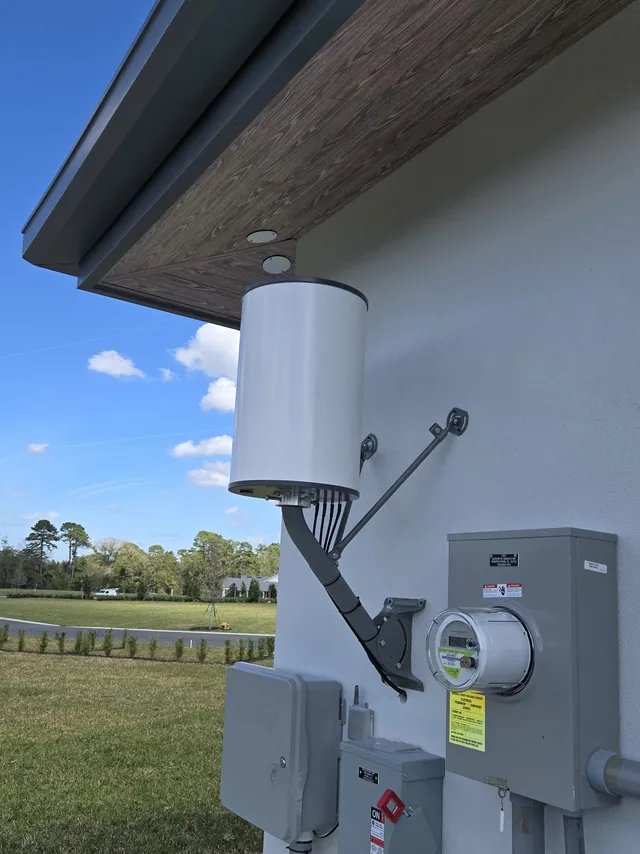
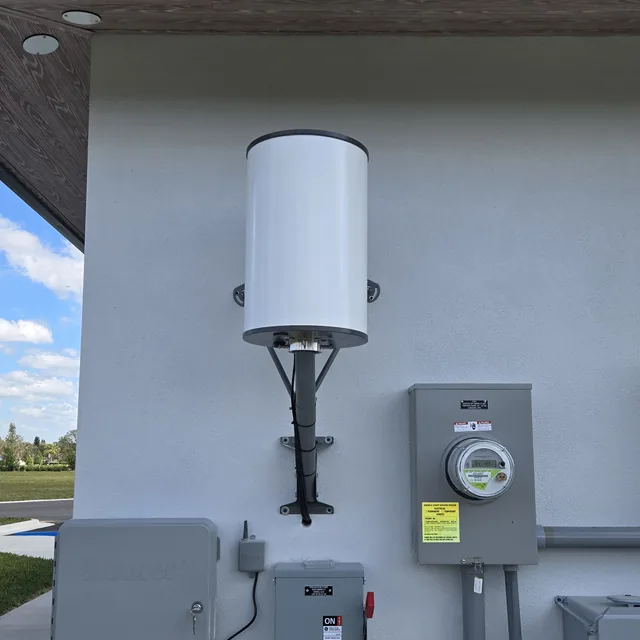
At a commercial building in east Orlando, a wireless bridge antenna is pole-mounted under the eave and a second antenna is wall-mounted beside the electrical meters and disconnects on the utility wall, carrying the network through the air instead of through a trench. On a second visit, in April 2025, two dome cameras went up under the eave beneath the antenna mast; that is the job on our Orlando security cameras page.
Small network jobs like that one are a large part of IT support in a spread-out metro: a workshop behind the office, a guard house at a gate, a second building across a parking lot, all needing the same network as the main building and none of them worth cutting pavement for.
What we support in Orlando
- Computer setup, replacement and decommissioning, with retired machines wiped before they leave
- Network analysis when an office is slow, and network security: firewalls, updates, multi-factor authentication and a separate guest network
- Email migration to a new platform or domain
- Routers, switches, firewalls, wireless access points and SIP trunks, installed and supported
- Remote support sessions for the problems that do not need a visit, and a visit for the ones that do
The full description of the ongoing arrangement, what managed IT covers and the questions businesses ask about it, is on the managed IT services page.
Call and describe what is breaking
Or what you are about to move into. We will come and look at it, at your building in Orlando, and tell you what we see before anything is quoted.
FL License #ES12001608
Common questions about IT support in Orlando
Is IT support in Orlando done on site or remotely?
Both, and the split follows the problem rather than a policy. Anything that is wrong with software, an account or a configuration can be fixed by remote session: a program that will not open, a mailbox that will not sync, a firewall rule that blocks the new scanner, a user who needs setting up. Remote is faster for those because nobody is driving, and it is how most day-to-day support happens for a small office.
Hardware, cabling and anything that needs eyes on the room are site visits: a dead switch, a server that will not boot, a drop that tests bad, a new suite, a move, or a slow network where the cause is a cable or a misplaced access point rather than a setting. In Orlando the site visit also covers the telecom room in a multi-tenant building, which cannot be reached remotely at all.
What should an Orlando office have ready before the first support visit?
Five things, and most offices have to hunt for at least two of them. The internet account: who the carrier is, the account number and where the modem or the handoff is, which in a multi-tenant building may be a room you do not have a key to. The passwords: the administrator logins for the server, the firewall, the router and the email tenant, and who holds them today, including any former provider or former employee. A count of the machines and their rough ages.
Then the software: the line-of-business applications the office cannot work without and the vendor contact for each, and where the backups go, if anywhere. The fifth is the building: the property manager’s contact and the rules for the telecom room. None of it needs to be tidy. A list on a notepad is enough, and the gaps in it are useful information in themselves.
What should change hands when an Orlando business switches IT providers?
Four things, and the first is the one most often left behind: the administrator credentials. The logins for the firewall, the switches, the wireless controller, the server, the email tenant, the domain registrar and the backup service belong to the business, and every one of them should be reset the day the handover happens, whether the parting is friendly or not. The second is the documentation: where the carrier hands off, which patch panel port feeds which desk, the firewall configuration exported to a file, and the list of software licenses and who they are registered to.
The third is the backups: where the copies are, the account that controls them, and proof of a restore that has been tried. The fourth is the vendors: the carrier account, the line-of-business software vendor, the printer contract and the domain and email accounts, each with the contact moved to someone who still works for you. A new provider who starts with those four in hand can be useful on day one. One who starts without them spends the first month finding out what the last one knew.
Orlando and the metro around it
IT support covers the same ground as the rest of our Orlando work, from the downtown towers to the office parks on the east side and the suburbs around them, with our office in Sanford north of the city in Seminole County. There is no showroom; we come to the building. Orlando also has pages for structured cabling and security cameras, and two of the towns around it each have a page for one service: security cameras in Clermont and business phone systems in Winter Garden. See the full service area
Get started today. Take the Technical Out of Technology.
Tell us what is down, how many people it is stopping and which building you are in. We will come to it.