
Tampa is the far end of our map, so the plan starts with the drive
Our crews are based in Central Florida, with an office in Sanford at the north end of the Orlando metro, and Tampa is the Gulf end of the territory we work: Interstate 4 the whole way, then Hillsborough County and, north of the city, Hernando County. The Tampa Bay and Hernando County listing on Google is ours, with the reviews under it, and it is a service-area profile for the same reason this page carries no address: there is no office in Tampa, and the work happens at your building.
That distance shapes how IT support works here. The day-to-day of a small office, a program that will not open, a mailbox that will not sync, a firewall rule for the new scanner, can be handled by remote session, and for that the drive does not come into it. The physical work, a dead switch, a server move, a new suite, a network that slows every afternoon, is a visit, and a visit to Tampa is planned as a full day or consecutive days with everything for that phase on the truck, the way every job on the Gulf side is scheduled. How often a Tampa office sees us in person is settled once we have seen the office, not promised on a web page.
Managed IT services or IT support: which one a Tampa business is asking for
The two searches mean two different arrangements, and the question at the end of this page draws the line in full. The short version: managed IT services is one company responsible for the computers and the network every month, before anything fails; IT support is a contractor who comes when something is broken or changing, paid by the job. We do both, and the first call is the same either way: describe the office, how many machines, what they run, where the data lives and who holds the passwords today. The ongoing arrangement, what managed IT covers and the questions businesses ask about it, is on our managed IT services page. This page is about what either one looks like for the buildings Tampa and Hernando County have.
IT for the buildings along I-4 and I-75, and up the Suncoast Parkway
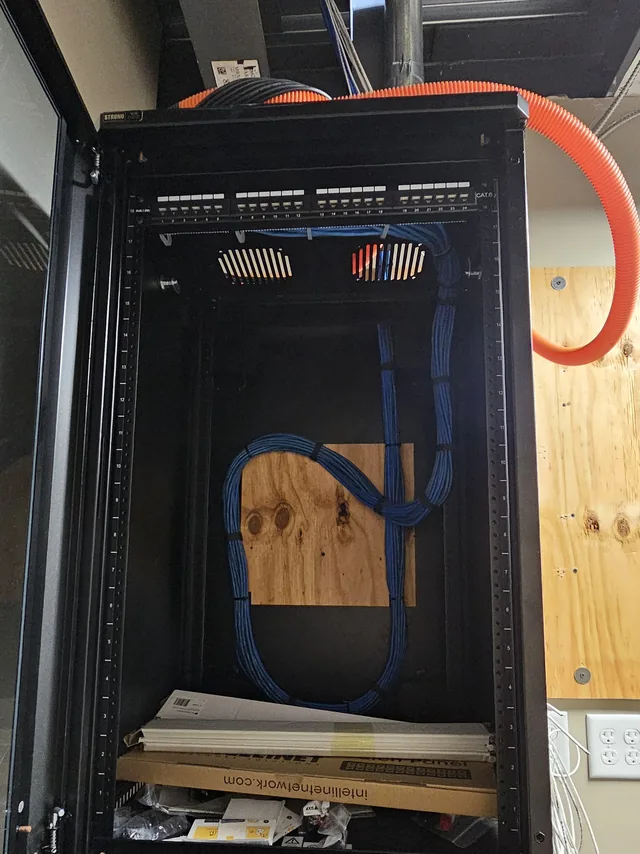
The distribution and warehouse buildings that line I-4 between the two metros, and I-75 through Hillsborough County, have IT problems a downtown office never sees. The network has to reach a forklift at the back of a rack aisle and a scanner at every dock door, the runs are long enough that copper alone will not cover them, and the network equipment often lives wherever the electrician left a receptacle. Support there starts with the physical plant: a proper rack in conditioned space, fiber where the distance demands it, access points placed from a survey rather than a guess, and a firewall that keeps the shipping system off the guest network. We install all of that, so the person supporting the warehouse management system also knows where the cable runs.
In Tampa itself the work is offices, clinics and multi-tenant buildings: workstations, the practice-management server or cloud tenant, devices in a clinic that must never share a network with the guest WiFi, and in a multi-tenant building a telecom room the landlord controls and a riser the suite’s network begins at. Retail and restaurants need the point-of-sale on its own segment, cameras on another, and guest WiFi on a third. Up the Suncoast Parkway in Hernando County, much of the building stock is new, and a commercial shell or a community clubhouse around Brooksville or Spring Hill gets its network designed from nothing: a small network that nobody staffs and everybody depends on.
Hurricane season on the Gulf side
Tampa Bay is a coastal metro with evacuation zones, and that changes the hurricane question for an office. In Orlando the risk is mostly power and internet. Near the bay the building itself may be behind an evacuation order for days, which means nobody can reach the server closet to shut anything down, bring anything up or carry a backup drive out. The plan has to assume the office is unreachable, not just dark.
That points the preparation in a clear direction: backups that already live off site or in the cloud, with a restore tried this year; a battery backup large enough to shut the server down cleanly on its own; a cellular failover on the firewall if the business cannot be offline; and a way for staff to work from wherever they evacuated to, which usually means the line-of-business application and the email are reachable without the office network. The list of who shuts what down belongs in May, and in Tampa it also needs a line for what happens if nobody can get to the building at all.
One Tampa job, and what it is not
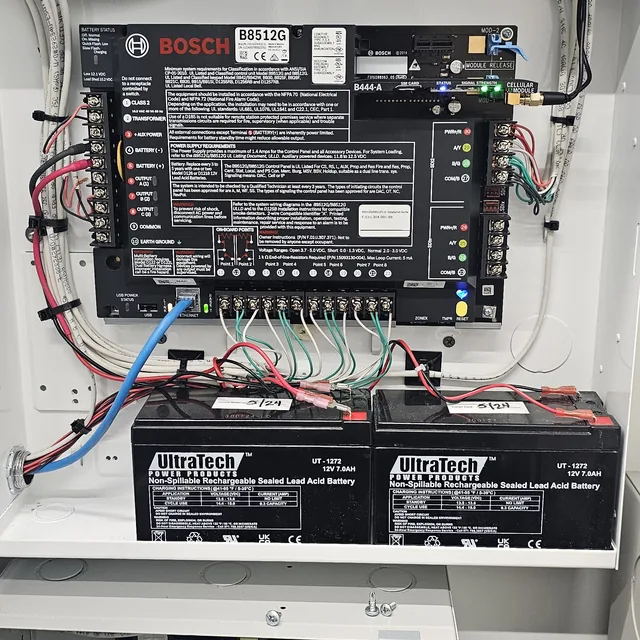
The Tampa job we show here is not an IT job, and we would rather say so than imply otherwise. At a commercial building in Tampa in July 2024 our crew installed a Bosch B8512G intrusion alarm control panel, with its cellular communicator, terminated wiring and battery backup. It is alarm work, the same trade as the cameras and access control we install, and the panel is on the projects page.
It is on this page because it is how the crews know the drive, and because the discipline in that cabinet, every conductor terminated and dressed, a battery backup sized for the load, a cellular path that does not depend on the building’s internet, is the discipline a network closet needs too. When a Tampa office asks us to look at its IT, that is the standard the rack gets held to.
What we support in Tampa
- Computer setup, replacement and decommissioning, with retired machines wiped before they leave the building
- Network analysis when an office or a warehouse is slow, and network security: firewall, updates, multi-factor authentication and a separate guest network
- Email migration to a new platform or domain
- Routers, switches, firewalls, wireless access points and SIP trunks, installed and supported by the same people
- Remote support sessions for the problems that do not need a visit, and a planned visit for the ones that do
The structured cabling, business WiFi and phone systems those machines run on are ours as well.
Call and describe the office
Tell us where it is, Tampa, Brooksville, Spring Hill or somewhere between, how many machines there are and what is breaking or changing. We will tell you on the phone whether it is somewhere we can support well, including the follow-up visit a year later, and look at it before anything is quoted.
FL License #ES12001608
Common questions about IT support in Tampa
Is your IT support in Tampa remote, or do you come to the building?
Both, and which one depends on the problem. Software, accounts and configuration are fixed by remote session: a program that will not open, a mailbox that will not sync, a firewall rule, a new user. Nobody drives for those, and they are most of the day-to-day support a small office needs. Hardware, cabling and anything that needs eyes on the room are visits: a dead switch, a server that will not boot, a new suite, a move, a slow network whose cause is a cable rather than a setting.
Tampa is a long drive from our base, so a visit is planned rather than improvised: a full day or consecutive days on site, the crew arriving with everything for that phase, the drive built into the quote instead of appearing on the invoice afterwards. How often an office needs us in person is settled after we have seen it. If a site is too small or too far for us to support well, we say so on the first call.
What is the difference between managed IT services and IT support?
Managed IT services is an ongoing arrangement: one company is responsible for the computers and the network every month, does the routine work on a schedule, and is the one that notices the small problems before they become large ones. IT support, as most people search for it, is the work itself: someone to come and fix what is broken, fit out a new suite, move a server or replace a firewall, paid for by the job.
Businesses with a handful of staff and nobody technical on the payroll usually end up wanting the first, because the practical question is who notices the failing drive, the expired warranty or the account that was never removed. Businesses that already have a provider, or an in-house person, usually want the second: a contractor who will come to the building in Tampa for the physical work their provider cannot do from a desk. We do both, and we will tell you which one the office you describe actually needs.
Our Tampa office is in an evacuation zone. What does that change about our IT?
It changes the assumption behind the plan. Most hurricane preparation for an office assumes someone can get to the building before the storm and again after it: shut the server down, pull a backup drive, bring the firewall up before the modem. Under an evacuation order none of that can be counted on, sometimes for days, and the building may be reopened to staff before power or internet are back.
So the plan has to work with nobody there. The backups live off site or in the cloud, and a restore from that copy has been tried. The battery backup shuts the server down cleanly by itself when the power goes. The applications and email the business runs on are reachable from wherever staff have gone, which may mean moving a server that only exists in the closet to a hosted service before the season rather than after it. And the written list of who does what includes the case where the answer is nobody until the zone reopens.
Tampa Bay, Hernando County and the rest of the map
SPCom Solutions is a service-area business: we come to your building, and there is no showroom to visit. Tampa, Brooksville and Spring Hill are covered from our Central Florida base, with the drive planned into each job as described on our Tampa Bay and Hernando County page. Back along I-4 the same crews work Orlando, Kissimmee, Winter Garden and Clermont, and Orlando has its own pages for IT support, structured cabling and security cameras. Tampa also has a page for security cameras. See the full service area
Get started today. Take the Technical Out of Technology.
Call and describe what is breaking or what you are about to move into, how many people it is stopping, and where in Tampa Bay the office is. We will tell you what we can do about it before anything is quoted.